> For the complete documentation index, see [llms.txt](https://dyns.ntd.asia/power-dynamics/llms.txt). Markdown versions of documentation pages are available by appending `.md` to page URLs; this page is available as [Markdown](https://dyns.ntd.asia/power-dynamics/artificial-intelligence/study-copilot-studio/core-agent-building-blocks/topics-and-the-authoring-canvas.md).

# Topics & the Authoring Canvas

Session 2.1 — the authoring canvas, topics, trigger phrases, and the core node types, with a Northwind Outfitters Returns & Exchanges topic built step by step.

{% hint style="info" %}
**Group 2 · Session 2.1** of the Copilot Studio course. Full plan on the [Mission](https://dyns.ntd.asia/power-dynamics/artificial-intelligence/study-copilot-studio/mission) page. Follows [How an Agent Decides](https://dyns.ntd.asia/power-dynamics/artificial-intelligence/study-copilot-studio/foundations/how-an-agent-decides).
{% endhint %}

Sessions 1.1 and 1.2 were about how Copilot Studio thinks — orchestration, harnesses, generative vs. classic response selection. This one is the first "build" session: you're going to construct an actual piece of conversation logic, the same kind of thing every agent in Copilot Studio is made of underneath.

That unit of logic is called a **topic**. Microsoft's own definition is plain: a topic represents a portion of a conversation between a user and an agent, and you define it on the **authoring canvas** — a low-code surface where you place **nodes** and connect them into a path. Each node does one small thing: send a message, ask a question, branch on a condition, hand off to another topic.

## What actually triggers a topic

Every agent ships with a set of topics already built in. Some are **system topics** — things like "end the conversation" or "escalate to a person." You can turn these off or tweak their nodes, but you can't create new ones or delete them outright. Everything you build yourself is a **custom topic**.

How does the agent know which topic to run? It depends on the orchestration mode from 1.2. With **generative orchestration**, the agent reads each topic's description and picks the best match for what the user's asking. With **classic orchestration**, it's **trigger phrases** doing the work — sample utterances that train the topic's natural-language matching. Microsoft's own guidance is specific here: **5 to 10 trigger phrases** per topic, short rather than long, and the match doesn't need to be exact. A topic with the trigger phrase "check store hours" still fires when someone types "see store opening hours" — the NLU model generalizes from the samples you give it.

{% hint style="warning" %}
**Worth sitting with:** trigger phrases aren't documentation. They're training data. Every phrase you add reshapes what the model considers "close enough" to this topic — which is exactly why vague or overlapping phrases across topics cause the wrong one to fire.
{% endhint %}

## The node types you'll actually use

The canvas gives you more node types than you'll need on day one. Here's the set that covers almost every topic you'll build in this course.

<table><thead><tr><th width="145">Node</th><th>What it does</th></tr></thead><tbody><tr><td><mark style="color:blue;"><strong>Message</strong></mark></td><td>Sends the customer text — an answer, a confirmation, a policy statement.</td></tr><tr><td><mark style="color:$warning;"><strong>Question</strong></mark></td><td>Asks the customer something and captures the reply in a variable. Choosing "multiple choice options" under <em>Identify</em> auto-builds a branch for each choice.</td></tr><tr><td><mark style="color:green;"><strong>Condition</strong></mark></td><td>Branches the path based on a variable's value — only available once a topic has variables to check.</td></tr><tr><td><mark style="color:violet;"><strong>Redirect / End</strong></mark></td><td>Hands off to another topic (and returns here when it finishes) or ends the current topic or the whole conversation.</td></tr></tbody></table>

Full reference: [Node types in Copilot Studio](https://learn.microsoft.com/microsoft-copilot-studio/authoring-create-edit-topics#node-types), which also lists Adaptive Card, Tool, and Advanced (generative answers, HTTP request) nodes for later sessions.

## Worked example — a Returns & Exchanges topic for Northwind Outfitters

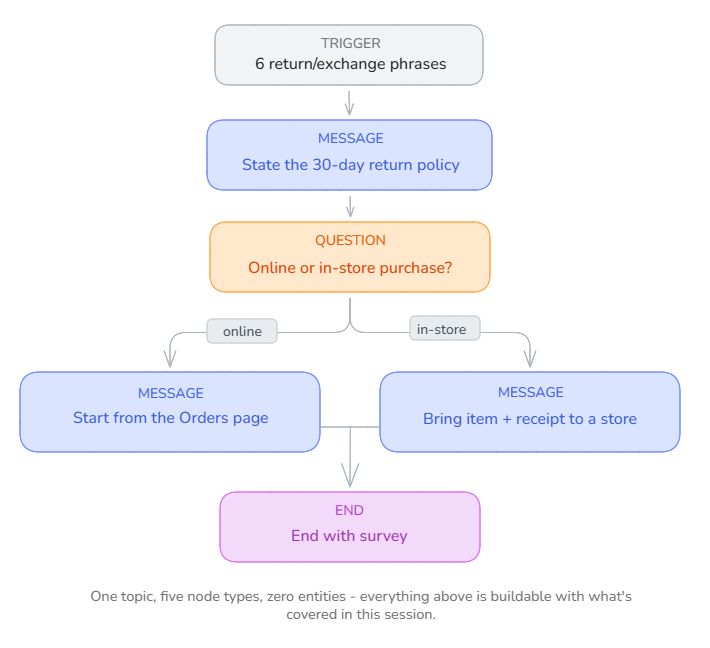
Northwind Outfitters is our running scenario for the rest of this course, and returns is one of its highest-volume questions. Here's the actual sequence you'd follow in Copilot Studio to build the topic, using only what's on the canvas right now — no entities or tools yet, those come in 2.2 and Group 4.

{% stepper %}
{% step %}

### Add a topic → From blank

A **Trigger** node appears on an otherwise empty canvas. This node can't be renamed, but everything about it — its phrases — is yours to define.
{% endstep %}

{% step %}

### Add 5–10 trigger phrases

Short, specific, and varied in wording — that's what trains the match: *how do I return an item*, *exchange policy*, *can I get a refund*, *return window*, *exchange for a different size*, *send something back*.
{% endstep %}

{% step %}

### Add a Message node — state the policy

"Northwind Outfitters accepts returns within 30 days of delivery, unworn and with tags attached." One fact, stated once, no hedging.
{% endstep %}

{% step %}

### Add a Question node — branch on purchase channel

"Was this an online order or an in-store purchase?" Set *Identify* to multiple choice with two options. Copilot Studio auto-creates one branch per option — you don't wire that up by hand.
{% endstep %}

{% step %}

### Give each branch its own Message node

Online → "Start your return from the Orders page using your order number." In-store → "Bring the item and your receipt to any Northwind Outfitters location."
{% endstep %}

{% step %}

### End the conversation with a survey

Closes out both branches and logs a satisfaction response you can review later on the CSAT analytics page.
{% endstep %}
{% endstepper %}

<figure><img src="https://4233060750-files.gitbook.io/~/files/v0/b/gitbook-x-prod.appspot.com/o/spaces%2FjhtQupP7ACZVtv3cCNCr%2Fuploads%2FngU3Dvb5az4bOvZAL2qb%2FSurvey-agent-sample.png?alt=media&#x26;token=61a6304d-fdbf-4e45-8dab-4a9f7a27a4a1" alt=""><figcaption></figcaption></figure>

One topic, five node types, zero entities — everything above is buildable with what's covered in this session. Notice what it *doesn't* do yet: it can't actually look up someone's order, and it can't remember the customer said "in-store" once the conversation moves to a different topic. Both of those need entities and variables — the very next session.

## Check your retrieval

Answer before you expand each one.

{% tabs %}
{% tab title="Question 1 of 4" icon="circle-question" %}
Your "store hours" topic has the trigger phrase "check store hours," and a customer types "see store opening hours." What happens?

* Nothing — the phrase has to match exactly to fire the topic
* The topic still fires — trigger phrases train a match, not a required exact string
* The agent asks the customer to rephrase using an exact trigger phrase
  {% endtab %}

{% tab title="Answer" icon="unlock" %}
**The topic still fires — trigger phrases train a match, not a required exact string.** They're training samples for the NLU model, not literal strings to match.
{% endtab %}
{% endtabs %}

{% tabs %}
{% tab title="Question 2 of 4" icon="circle-question" %}
You want a Question node to send the conversation down a different path depending on which of three options the customer picks. What do you set under *Identify*?

* A Condition node placed after the question
* Multiple choice options — Copilot Studio auto-builds one branch per choice
* A separate topic for each possible answer
  {% endtab %}

{% tab title="Answer" icon="unlock" %}
**Multiple choice options — Copilot Studio auto-builds one branch per choice.** No manual wiring needed.
{% endtab %}
{% endtabs %}

{% tabs %}
{% tab title="Question 3 of 4" icon="circle-question" %}
You turn a custom topic Off instead of deleting it. What's true?

* It's removed from the published agent entirely
* It stops triggering, but still publishes with the agent and can be turned back on
* It merges its trigger phrases into the fallback topic
  {% endtab %}

{% tab title="Answer" icon="unlock" %}
**It stops triggering, but still publishes with the agent and can be turned back on.** Off means dormant, not gone — useful for parking a topic mid-edit.
{% endtab %}
{% endtabs %}

{% tabs %}
{% tab title="Question 4 of 4" icon="circle-question" %}
How many trigger phrases does Microsoft recommend per topic to properly train the match?

* 1–2, kept as close to the topic name as possible
* 5–10, short and varied in wording
* 20+, to cover every possible phrasing
  {% endtab %}

{% tab title="Answer" icon="unlock" %}
**5–10, short and varied in wording.** Few enough to write by hand, enough for the model to generalize from.
{% endtab %}
{% endtabs %}

### Match the node to the job

<table><thead><tr><th width="320">You need to…</th><th>Reach for</th></tr></thead><tbody><tr><td>Tell the customer the return window</td><td>Message node</td></tr><tr><td>Find out if the order was online or in-store</td><td>Question node (multiple choice)</td></tr><tr><td>Send the conversation into a shared "verify identity" topic</td><td>Redirect node</td></tr><tr><td>Stop this topic early on one branch, but keep the rest of the conversation going</td><td>End current topic node</td></tr></tbody></table>

## Reflection

<details>

<summary>My essay frames skill as knowledge that's been proven against reality through repetition and failure. A topic's trigger phrases are exactly that kind of thing — untested guesses about how customers actually talk, until real conversations prove them right or wrong. What would you actually need to watch, once this topic is live, to know whether your trigger-phrase guesses were any good?</summary>

{% hint style="info" %}
**ONE REASONABLE ANSWER**\
Writing trigger phrases is authoring a hypothesis about your customers' language, not a fact about it. The signal that tells you whether the hypothesis held up isn't whether the topic feels complete on the canvas — it's what happens in real conversations: which utterances failed to match and fell through to a "did you mean" disambiguation or a fallback topic. Copilot Studio's analytics surface exactly this. Reviewing unresolved or misrouted conversations and folding the real phrasing back into your trigger-phrase list is the same repetition-and-correction loop the essay describes for skill generally — the topic doesn't become good at listening the day you publish it, it becomes good at listening after a few rounds of watching where it failed.
{% endhint %}

</details>

## Read next

The single highest-leverage skill in topic authoring: [Design effective trigger phrases](https://learn.microsoft.com/microsoft-copilot-studio/guidance/trigger-phrases-best-practices). It's why a Copilot Studio agent feels like it's listening instead of pattern-matching.

{% hint style="success" %}
**Key takeaway:** A topic is trigger phrases plus a chain of nodes on the canvas — get the phrases specific and varied, and the branching mostly builds itself.
{% endhint %}

## Sources

* [Create and edit topics — Microsoft Learn](https://learn.microsoft.com/microsoft-copilot-studio/authoring-create-edit-topics)
* [Manage topics — Microsoft Learn](https://learn.microsoft.com/microsoft-copilot-studio/authoring-topic-management)
* [Design effective trigger phrases — Microsoft Learn](https://learn.microsoft.com/microsoft-copilot-studio/guidance/trigger-phrases-best-practices)
